> For the complete documentation index, see [llms.txt](https://docs-epc.gitbook.io/ncs-documents/llms.txt). Markdown versions of documentation pages are available by appending `.md` to page URLs; this page is available as [Markdown](https://docs-epc.gitbook.io/ncs-documents/customer-support/restore-shutoff-compute-instance.md).
# Restore Shutoff Compute Instance
การ Restore Shutoff Compute Instance ด้วยตัวเอง
ในกรณีที่ Shutoff Compute Instance ไว้ แต่ไม่สามารถ Start กลับมาได้ ในกรณีที่ Machine Type เดิมไม่ Available สามารถแก้ไขได้ด้วยตัวเอง โดยทำตามขั้นตอนนี้
{% hint style="info" %}
ทำได้เฉพาะกับ Compute Instance ที่ Shutoff เองโดยผู้ใช้งาน หรือ Shutoff ด้วย [Scheduling](/ncs-documents/scheduling/schedules/create-schedule.md)
{% endhint %}
## Instructions
### 1. Delete Shutoff Compute Instance
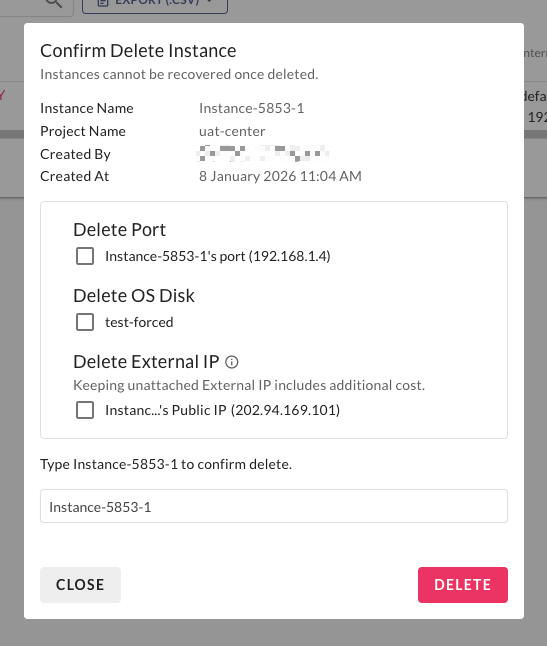
ลบ Compute Instance โดยเก็บ Port, OS Disk, Data Disk และ External IP ไว้ โดยไม่ติ๊กเลือก Resource ในหน้า Delete Compute Instance
 ### 2. Relaunch Compute Instance
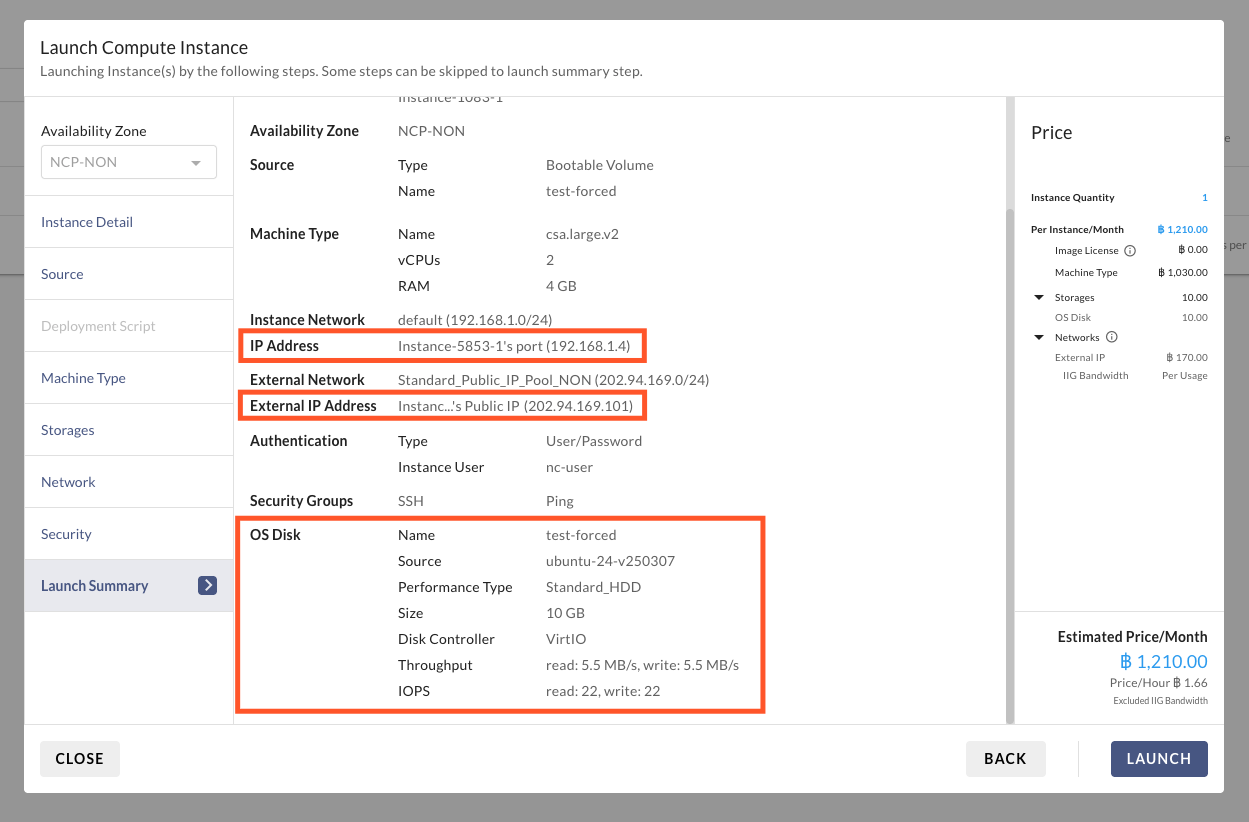
สร้าง Compute Instance ใหม่ โดยเลือก Port, OS Disk, Data Disk และ External IP ของ Compute Instance เดิม
โดยสามารถเลือก Machine Type ที่เล็กลง เพื่อให้สามารถขึ้นระบบได้ไว โดยไม่ต้องรอ Machine Type เดิม Available ได้
### 2. Relaunch Compute Instance
สร้าง Compute Instance ใหม่ โดยเลือก Port, OS Disk, Data Disk และ External IP ของ Compute Instance เดิม
โดยสามารถเลือก Machine Type ที่เล็กลง เพื่อให้สามารถขึ้นระบบได้ไว โดยไม่ต้องรอ Machine Type เดิม Available ได้
 ## FAQ
1. Q: Compute Instance ที่ถูก Shutoff และ Lock สามารถดำเนินการวิธีนี้ได้หรือไม่?\
A: Compute Instance ถูก Lock เกิดได้จาก[ยอดเงินติดลบ หรือมียอดค้างชำระมากกว่าที่กำหนด](/ncs-documents/nipa-cloud-space-overview/billing-and-wallet/insufficient-wallet-balance.md#pause-compute-insnstance) โดยจะยังสามารถลบ Compute Instance ได้ แต่จะไม่สามารถสร้าง Compute Instance ใหม่ได้ จนกว่าจะชำระเงินครบท้วน
## FAQ
1. Q: Compute Instance ที่ถูก Shutoff และ Lock สามารถดำเนินการวิธีนี้ได้หรือไม่?\
A: Compute Instance ถูก Lock เกิดได้จาก[ยอดเงินติดลบ หรือมียอดค้างชำระมากกว่าที่กำหนด](/ncs-documents/nipa-cloud-space-overview/billing-and-wallet/insufficient-wallet-balance.md#pause-compute-insnstance) โดยจะยังสามารถลบ Compute Instance ได้ แต่จะไม่สามารถสร้าง Compute Instance ใหม่ได้ จนกว่าจะชำระเงินครบท้วน